Cost optimization features
Decide which Azure cost changes are worth making.
Start with open savings ranked by potential monthly impact, then investigate high-severity anomalies. Review commitment inventory, cost, utilization, and coverage before your team decides what to change. CloudMonitor does not change Azure resources.
Sample organization. Potential savings are upper bounds. Your team must validate and make each change.
Usage Optimization
Start with the largest savings opportunity.
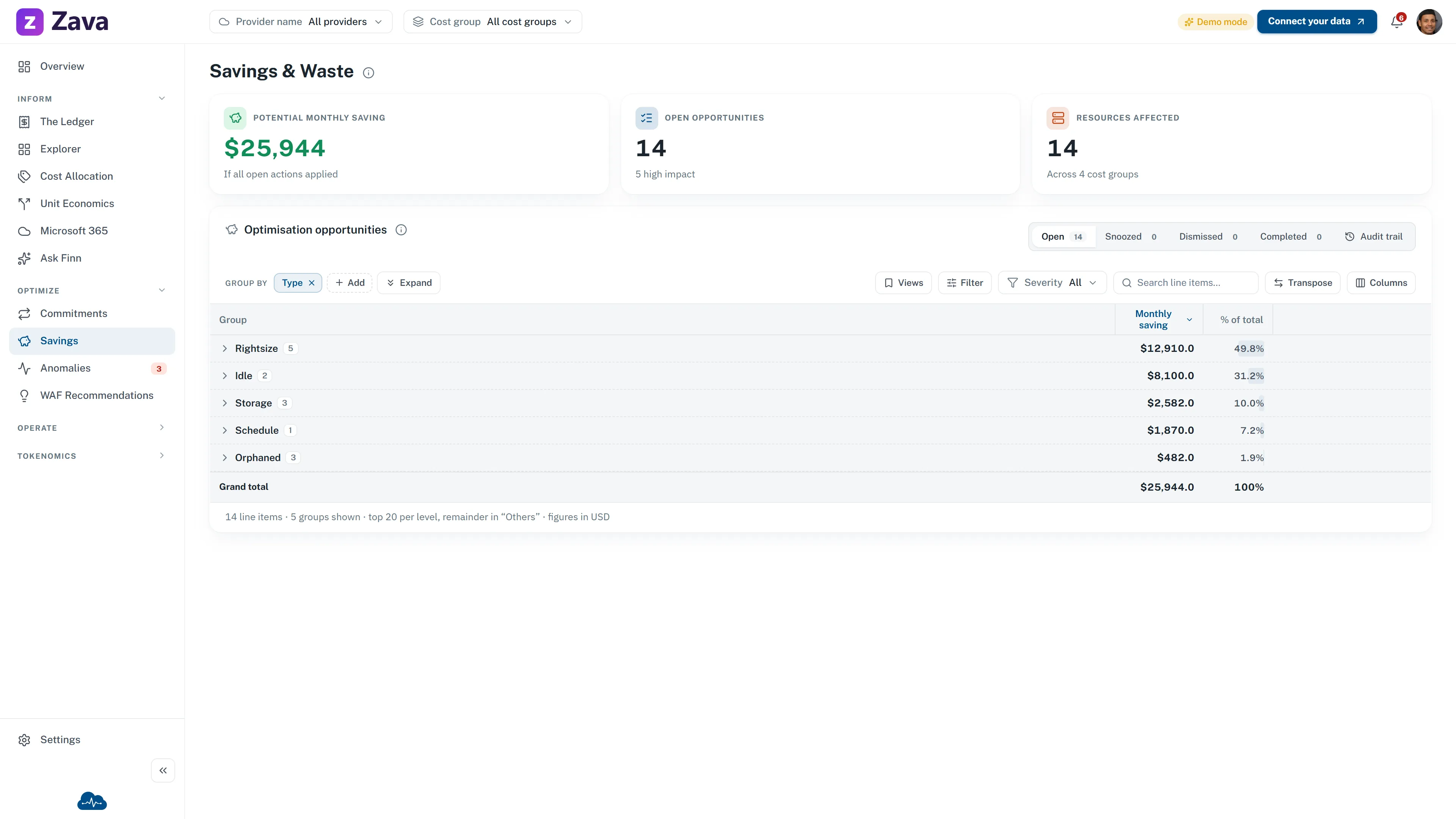
CloudMonitor groups open rightsizing and waste opportunities by type, then sorts them by potential monthly savings. Engineers open the affected resource in Azure to check the proposed change. They can postpone or dismiss an unsuitable finding. If they make the change, CloudMonitor closes the finding when the next scan no longer detects it.
CloudMonitor does not change the Azure resource. Your team validates and makes the change.
Savings & Waste · sample data
Open opportunities, ranked by monthly saving
Filter to a cost group, then open the affected resource in Azure.
Open Savings & Waste with sample data →
Rate Optimization
Commit to the baseline, not the peak.
CloudMonitor reports commitment inventory, cost, utilization, and coverage. Your team reviews the evidence and completes any purchase in Azure. Automated purchase recommendations are not connected yet.
- Review recorded Azure Hybrid Benefit status; confirm eligibility in Azure
- Compare Reservation, Savings Plan, and PAYG for the steady baseline
- Keep peaks and uncertain growth on variable pricing
This is an example decision model. CloudMonitor does not buy commitments. Your team approves and completes each purchase in Azure.
Illustrative decision model
Which rate fits the steady baseline?
- 1Rightsized?Yes
- 2Stable baseline?Yes
- 3Same family and region?Yes
- Model a ReservationCompare term and scope before purchase
Anomaly Management
Give every cost spike an owner and a next action.
Each finding keeps its dollar impact and affected scope. Your team assigns an owner and next action during review. The workflow separates available features from connector work on the published roadmap.
Anomaly-to-ticket workflow and delivery status
- Available 09:12 · Sample anomaly $1,840 above baseline
Subscription and resource attached
- Available Triage action Assign an owner
Cost group and severity guide the handoff
- In progress Q3 2026 Email alert
Notify the owning team by email
- Available Available now Teams alert
Post the finding to the owning channel
A person investigates the finding and approves any change.
Check current connector status →Ask Finn
Trace an answer back to the cost evidence.
Ask Finn answers cost questions with your organization’s CloudMonitor data. It can explain and recommend, but it cannot approve or make a change.
- Who receives answers
- Active, licensed organization administrators on Professional and Enterprise can receive answers. Verified support staff can also receive answers in Support mode.
- What the answer can read
- The service identity can read cost data across the organization. It does not limit answers to the viewer’s report permissions.
- What stays human
- Ask Finn cannot change budgets, allocation rules, tags, Azure resources, or other customer data. Your team verifies and approves each action.
- 01 Scope the question Name the provider, period, cost group, and cost basis.
Ask Finn does not use the report’s top-bar filters. Include the scope in your question.
- 02 Read the evidence Use the validated table, chart, or link to Explorer.
Ask Finn shows this evidence only when the answer service provides the scope, source, and cost context.
- 03 Verify before acting Confirm the same scope in The Ledger or Azure.
A person decides whether to make the change, postpone the finding, or dismiss it.
Continue exploring
Follow the work from finding to owner.
See the cost optimization workflow.
Open the public savings demo on sample data, then review the evidence and next step. The demo does not connect to your environment.