
What’s New and How to Apply It?
The FinOps Framework 2026 for Azure is not just another update to cloud cost management guidance. It reflects a bigger shift in how organisations think about technology spend. FinOps is now being positioned as a way to maximise business value across a wider technology estate, not just to tidy up the cloud bill at the end of the month. For Azure users, that matters because spend decisions are now tied to AI, data platforms, SaaS, sustainability, and executive strategy, not only virtual machines and storage.
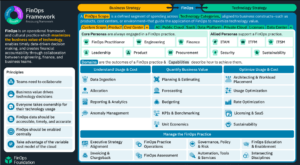
If you are still treating FinOps as a finance-only reporting exercise, 2026 is your wake-up call. The framework now expects stronger collaboration between engineering, finance, and business teams, with faster decisions, clearer accountability, and better alignment to outcomes that matter to the organisation.
Why the FinOps Framework 2026 matters for Azure teams?
Azure environments tend to grow quickly. One team spins up compute, another experiments with AI, someone adds storage, and soon the monthly bill becomes hard to explain. Microsoft’s FinOps guidance says the framework is designed to help organisations drive greater business value from cloud through two big themes, understanding usage and cost, and quantifying business value.
That is exactly why the 2026 update is important. Microsoft’s FinOps on Azure page now frames FinOps around cost efficiency, AI-driven innovation, and sustainable growth. In other words, Azure cost control is no longer just about reduction, it is about making smarter investment choices.
For teams using tools like CloudMonitor, this matches the product story quite closely. CloudMonitor positions itself around real-time cloud cost monitoring, cost-saving recommendations, dashboards by business unit or cost group, and automated governance for Azure spend.
What is new in FinOps Framework 2026?
|
1. Executive Strategy Alignment is now a formal capability
The biggest change in the 2026 framework is the new Executive Strategy Alignment capability. The FinOps Foundation says this capability connects technology value to business strategy, helping leaders compare options, make trade-offs, and support strategic investment decisions.
That is a major shift for Azure users. It means your FinOps conversations should now go beyond, “How do we reduce this month’s spend?” and move towards, “Which workloads, platforms, and experiments deserve more investment, and why?”
2. FinOps Scopes are broader and more practical
The 2026 framework deepens the concept of FinOps Scopes, which were introduced in 2025. These Scopes are now described as the practical way business strategy is translated into FinOps activities. The framework also adds richer guidance on how Scopes start, evolve, and interact with each other over time.
For Azure teams, this is useful because real organisations do not manage a single cloud bill. They manage product lines, environments, business units, shared services, AI experiments, and data workloads. Scopes help you structure that reality instead of forcing everything into one generic cost bucket.
3. Technology Categories now include more than public cloud
The framework now includes Technology Category pages for areas such as Public Cloud, SaaS, Data Centre, Data Cloud Platforms, and AI. The FinOps Foundation says these updates reflect the growing reality that FinOps is now managing technology value across multiple categories, not just public cloud.
This matters for Azure users because many organisations are now mixing Azure with SaaS tools, data platforms, and AI services. The old cloud-only lens is too narrow.
4. Several capabilities were renamed and widened
The 2026 update also refreshes several capabilities so they apply across all technology categories. Notable changes include:
- Usage Optimisation instead of Workload Optimisation
- Governance, Policy and Risk instead of Policy and Governance
- Automation, Tools and Services instead of FinOps Tools and Services
- KPI and Benchmarking instead of Benchmarking
- Architecting and Workload Placement instead of Architecting for Cloud
- Sustainability instead of Cloud Sustainability
This is important because it shows the framework is maturing. Optimisation still matters, but it now sits inside a broader business conversation.
How to apply FinOps Framework 2026 on Azure?
Step 1. Start with business questions, not just the bill
Before looking for savings, define what the business needs to know. Do leaders want lower run-rate cost, better unit economics, improved forecast accuracy, or proof that an AI project is worth the investment? Microsoft’s FinOps guidance places reporting, forecasting, budgeting, and unit economics at the centre of the practice.
A simple way to begin is to map each major Azure workload to a business question, such as:
- What does one customer transaction cost?
- Which environment is consuming the most waste?
- Which product line is growing fastest in cost?
- Which experiments should be paused or scaled?
That is the mindset shift 2026 is asking for.
Step 2. Fix allocation first
If your Azure spend is not allocated properly, everything else becomes guesswork. CloudMonitor highlights business-unit and cost-group reporting, cost allocation, and chargebacks as core parts of its approach, which is exactly where many FinOps programmes need to start.
Good allocation usually means:
- Consistent tagging standards
- Clear ownership for shared services
- Separate reporting for dev, test, and production
- Naming conventions that match how the business works
- Regular checks for untagged or mis-tagged resources
When allocation is clean, forecasting and accountability become much easier.
Step 3. Use Azure-native insights alongside FinOps tooling
Microsoft’s general FinOps best practices recommend using Azure Resource Graph to gain insight into resources, and Microsoft Learn also points practitioners to reporting, anomaly management, forecasting, budgeting, and unit economics.
In practice, that means combining:
- Azure platform data
- Cost management reporting
- Utilisation data
- Alerts for anomalies
- Workflow automation for remediation
CloudMonitor’s site describes exactly this style of operating model, with real-time monitoring, recommendations for oversized or unused resources, and scheduled reporting.
Step 4. Optimise usage with business context
The 2026 framework keeps optimisation at the core, but it makes one thing clear, optimisation only matters when it supports strategy. That means a workload should not be right-sized just because it is idle. It should be right-sized because the business understands the impact, risk, and value of that decision.
On Azure, this usually means focusing on:
- Underutilised virtual machines
- Idle or oversized storage
- Spiky environments that need autoscaling
- AI workloads that need clearer usage boundaries
- Shared services that should be reallocated fairly
Microsoft also notes that deleting or resizing underutilised resources can improve both cost and sustainability outcomes.
Step 5. Build executive reporting that shows value, not noise
The framework now expects FinOps to speak the language of leadership. That means reports should highlight business outcomes, not just charts of raw spend. The new Executive Strategy Alignment capability exists for exactly this reason.
A good executive dashboard should answer:
- Are we spending in line with strategy?
- Which investments are creating value?
- Where are we overspending relative to demand?
- What actions will improve forecast confidence?
- Which teams need support or intervention?
That kind of reporting turns FinOps from a control function into a decision-making function.
Step 6. Automate where possible
Manual reviews do not scale. Microsoft’s latest FinOps toolkit update in January 2026 focused on stability, usability, Key Vault purge protection, and improved export handling. That may sound operational, but it reinforces a bigger point, mature FinOps programmes need reliable tooling and repeatable automation.
Automation should cover things like:
- Idle resource detection
- Alert routing
- Policy checks
- Export pipelines
- Chargeback reports
- Recommendation workflows
CloudMonitor also presents automation as part of its value, with 24×7 monitoring and automatic recommendations.
Real-world Azure use case
Imagine a SaaS company running its product on Azure. The engineering team has production APIs, a staging environment, and an AI feature in active testing. Finance wants a cleaner forecast, and leadership wants to know whether the AI feature is worth scaling.
Using the FinOps Framework 2026, the company can:
- Create separate Scopes for production, staging, and AI experimentation
- Allocate spend by cost group or product line
- Track unit cost per customer or transaction
- Use Azure Resource Graph and cost reports to find waste
- Show executives which investments are delivering value
This approach is consistent with Microsoft’s framing of FinOps around business value, reporting, forecasting, budgeting, and unit economics.
Common mistakes to avoid
Even strong teams get FinOps wrong when they:
- Treat FinOps as a finance-only function
- Optimise resources without understanding business impact
- Ignore shared services and allocation rules
- Wait until month end to act on cost issues
- Leave AI, SaaS, and data platforms out of the conversation
- Focus on savings only, not value creation
The 2026 framework is explicitly designed to move teams away from that narrow view.
Future trends to watch
Three trends stand out in 2026.
First, FinOps is becoming a board-level conversation. The framework now places stronger emphasis on executive decision support and strategic alignment.
Second, AI is now a first-class Technology Category in the framework. That means AI spend will increasingly need its own forecasting, governance, and value measurement model.
Third, sustainability is broader than cloud infrastructure. The updated capability now covers more technology categories and reflects carbon considerations across on-premises, SaaS, colocation, and end-user computing as well.
Conclusion
The FinOps Framework 2026 for Azure is a sign that cloud financial management has matured. It is no longer just about reducing waste. It is about connecting technology spending to business strategy, operating with better allocation and governance, and making faster decisions across cloud, AI, and the wider technology estate.
For Azure teams, the practical takeaway is simple. Start with allocation, move to visibility, build business-aligned Scopes, automate optimisation, and report in a way leaders can act on. That is how FinOps becomes a real operating model, not just a monthly report.

- FinOps Framework 2026 Explained for Azure Users - April 17, 2026
- Azure Cost Controls in CI/CD Pipelines: Shift-Left FinOps for Azure - April 8, 2026
- AI Cloud Cost Management: How Automation Is Replacing Manual Azure Reviews? - April 1, 2026