
From Alerts to Action: Real-Time Cloud Cost Anomaly Detection Deep Dive
Cloud computing enables rapid scale, but without continuous monitoring, cloud costs can grow unexpectedly. Real-time cloud cost anomaly detection is a critical FinOps capability that helps teams identify abnormal spending as it happens – rather than discovering issues at month-end. By analyzing cost and usage data continuously, organizations can detect sudden spikes, prevent bill shock, and maintain financial control.
The FinOps Foundation defines a cloud cost anomaly as an unexpected increase in cloud spend that deviates from historical patterns. In practice, anomaly detection ensures that misconfigured resources, runaway workloads, or hidden data egress charges are identified early and addressed before they impact budgets.
Architecture of Real Time Cloud Cost Anomaly Detection
A modern anomaly detection system combines cost data ingestion, analytics, visualization, and alerting.
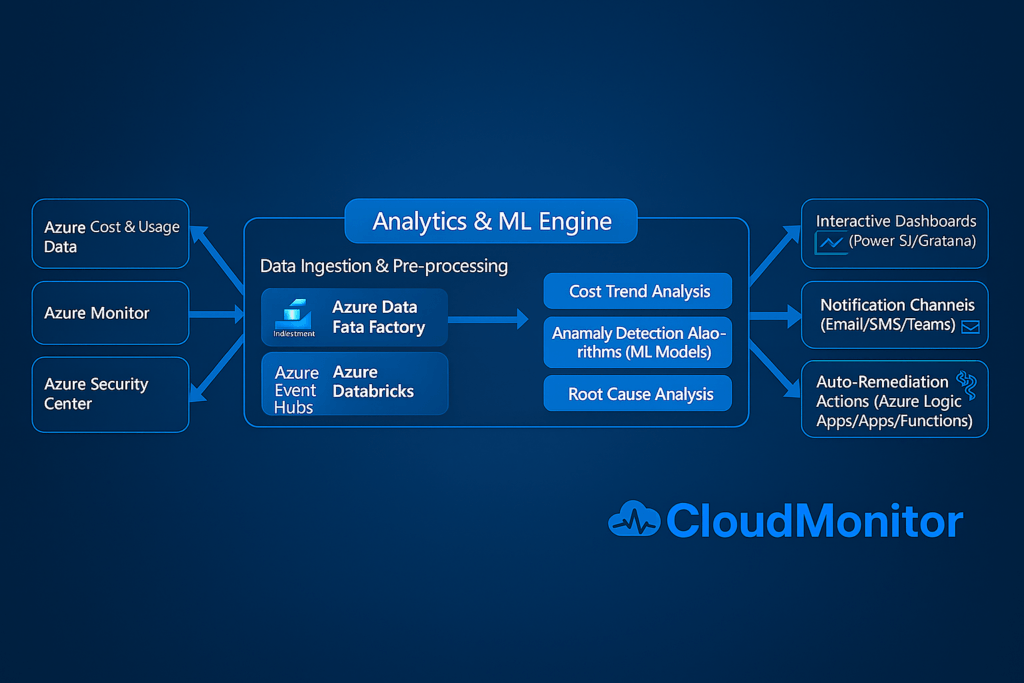
Data Ingestion via Azure APIs
Azure Cost Management and Billing APIs provide detailed cost and usage data at the subscription, resource group, and resource level. CloudMonitor securely ingests this data within the customer’s Azure tenancy on a near real-time or scheduled basis.
Analytics Engine
Ingested data is analyzed using a combination of rules, statistical models, and machine learning. CloudMonitor’s analytics engine evaluates historical trends and expected baselines to identify unusual spending behavior. Azure-native services such as the Anomaly Detector API can also be used to detect time-series outliers.
Dashboards and Reporting
Processed insights are surfaced through Power BI FinOps dashboards. These dashboards visualize daily spend trends, budget performance, and detected anomalies, allowing teams to quickly understand where and why costs have changed.
Alerts and Notifications
When an anomaly is detected, real-time alerts are delivered via Microsoft Teams, Slack, or email. Alerts include contextual information so teams can investigate immediately instead of waiting for monthly billing reports.
Techniques for Detecting Cost Anomalies
Effective anomaly detection relies on multiple complementary techniques.
- Threshold-Based Detection
Alerts are triggered when spending exceeds predefined limits, such as daily costs surpassing a percentage of the previous day or budget. This approach is simple but requires tuning to avoid noise. - Time-Series and Statistical Models
Historical cost data is used to establish expected spending patterns. Deviations outside a confidence range after accounting for trends and seasonality are flagged as anomalies. - Seasonal and Contextual Baselines
Models can incorporate known usage patterns, such as weekday vs. weekend behavior or planned deployments, to improve accuracy and reduce false positives. - Unit Cost and Ratio Monitoring
Anomalies may also appear in derived metrics like cost per VM hour or cost per transaction. Sudden changes in unit cost often indicate configuration issues or pricing inefficiencies.
A hybrid approach combining thresholds and time-series analysis provides the most reliable results.
FinOps Remediation Workflow: Alert to Action
Detecting an anomaly is only valuable when followed by action.
- Alert
An unexpected cost spike is detected and a real-time notification is sent to the relevant team. - Investigate
Using Power BI dashboards or Azure Cost Analysis, teams identify which service or resource caused the increase and when it started. - Engage Ownership
Resource tagging enables quick identification of the responsible team or application owner. - Remediate
Teams take corrective action, such as resizing resources, stopping idle workloads, or adjusting autoscaling rules. Automated remediation workflows can further reduce response time. - Review and Prevent
After resolution, thresholds, policies, or budgets are updated to prevent similar issues in the future.
Visualizing Anomalies with Power BI
Power BI dashboards make cost anomalies easy to understand and act upon. Common views include daily cost trends with anomaly markers, cost breakdowns by service or resource group, and budget utilization metrics. These visuals help teams pinpoint issues quickly and support data-driven FinOps decisions.
Benefits of Real Time Cost Anomaly Detection
Organizations that adopt real-time anomaly detection gain:
- Proactive control over cloud spending.
- Faster identification of cost drivers
- Reduced cloud waste and budget overruns
- Improved accountability across engineering teams
- Continuous, measurable cost optimization
Take Control of Cloud Costs with CloudMonitor
Real-time cloud cost anomaly detection is essential for mature FinOps practices. CloudMonitor enables Azure-focused organizations to detect anomalies early, visualize cost drivers through Power BI, and act before small issues become expensive problems.

- Observability for AI-Powered Cloud - April 24, 2026
- FinOps Framework 2026 Explained for Azure Users - April 17, 2026
- Azure Cost Controls in CI/CD Pipelines: Shift-Left FinOps for Azure - April 8, 2026