Azure billing data, ready for FinOps review.
CloudMonitor reads scheduled FOCUS exports and supporting billing datasets through customer-approved, scoped access. It builds cost reports, first-match allocation, anomaly review, and commitment reporting. CloudMonitor runs on Microsoft Fabric: in your own Fabric tenant by default, or CloudMonitor-hosted.
Azure Cost Management writes the raw FOCUS export to storage you control. CloudMonitor reads that export and supporting billing datasets, while workload and resource-metadata access stays read-only.
- Keeps billed and effective cost distinct for invoice and allocation questions.
- Assigns each charge to exactly one cost group through ordered rules; unmatched charges remain Unallocated.
- Leaves the raw FOCUS export in Azure storage under your control.
- Keeps workload and resource-metadata access read-only; your team makes changes in Azure.
Cost visibility
Trace a change from total to resource.
The Ledger and Explorer keep the Azure cost rows available for different questions. Group the rows by the available dimensions, save a useful analysis, or continue into the billing detail behind a change.
- Group by available Azure cost dimensions for the investigation
- Switch charts and breakdowns without changing the underlying rows
- Save the analysis so it is ready for the next review
Public demo · sample data
Allocation
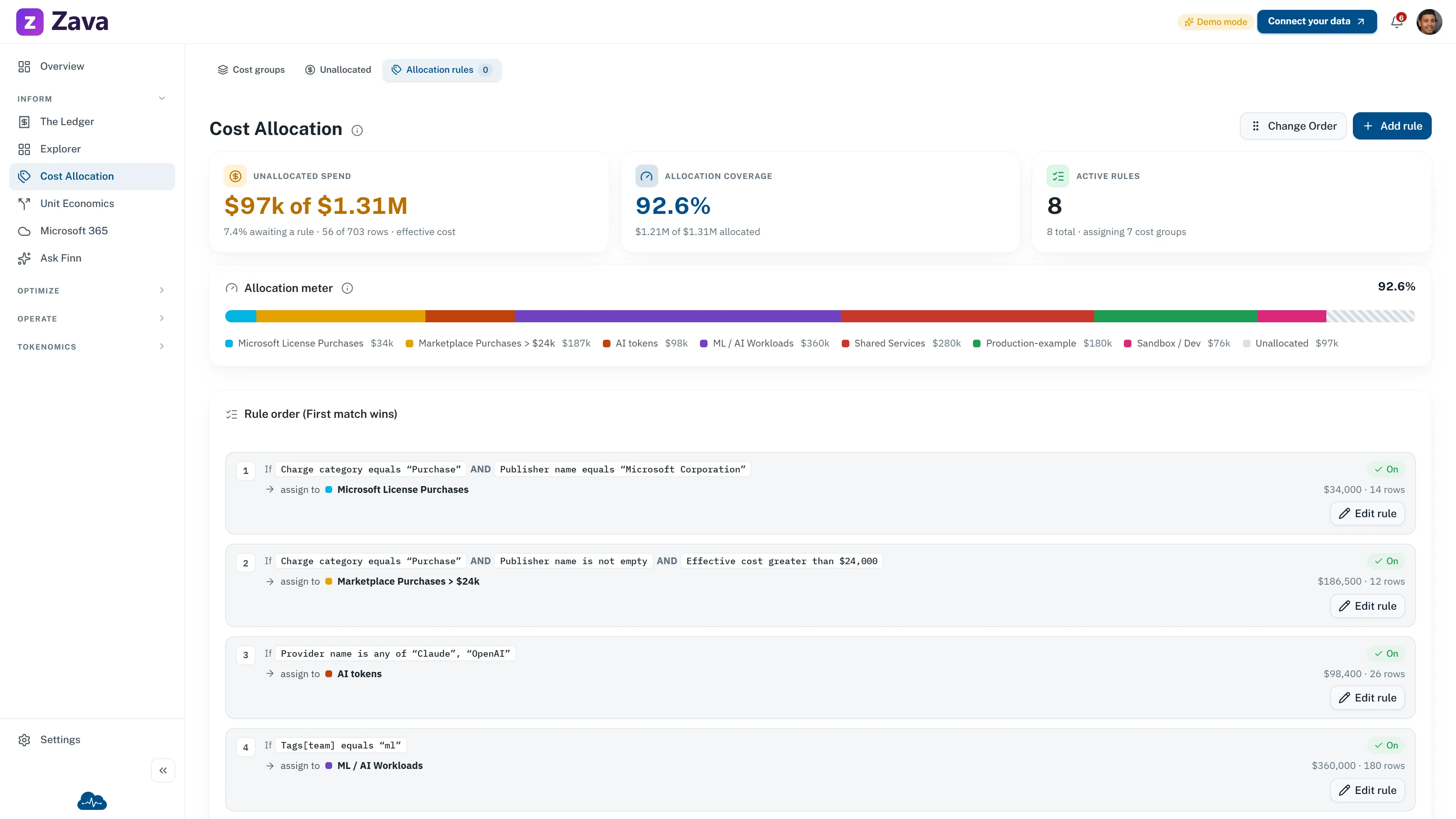
Send each charge to one accountable cost group.
Cost Allocation evaluates rules in order and stops at the first match. Each charge belongs to exactly one cost group; anything unmatched falls into the built-in Unallocated group.
- Rule order is meaningful because the first matching rule wins
- Unallocated stays visible until an admin adds or changes a rule
- Allocation changes reporting in CloudMonitor, not tags on the Azure resource
Public demo · sample data
Commitments
Review the commitments you already own.
The Commitments screen reports reservation and Savings Plan cost, utilization, coverage, and savings. Your team validates the evidence and completes any purchase in Azure.
- Use billed cost for purchase transactions and effective cost for amortized spend
- Check utilization on existing commitments before adding coverage
- Review Hybrid Benefit status in the Virtual Machines report; confirm eligibility in Azure
Public demo · sample data
Anomaly review
Review spikes that clear both workspace thresholds.
CloudMonitor raises an anomaly only after both the configured minimum cost change and minimum percentage change are cleared. Open items show impact, severity, affected scope, a derived root cause, and a next step.
- Both thresholds must be cleared before an item is raised
- Unresolved impact is excess spend above baseline, not total resource cost
- Owner can be blank when the available metadata does not identify one
Public demo · sample data
Azure Cost Management writes your raw FOCUS export to a storage account you own, and it stays there. CloudMonitor reads it through a OneLake shortcut and does the ingest, cleansing and modeling in our own Fabric tenancy, in the Azure and Microsoft Fabric region you choose during onboarding. That much is the same in both arrangements. Where the finished data comes to rest is what your choice settles: in your own Fabric tenant we write the modeled cost tables into a lakehouse in your workspace, on your capacity, and deploy the semantic model and the CloudMonitor app there on top of them. Under CloudMonitor-hosted, those stay in the workspace we run for you inside our tenancy.
Supporting datasets depend on the billing agreement and scope. CloudMonitor does not inspect application data or change Azure resources. Architecture and data flow sets out where each layer runs in both arrangements.
Use billed cost for invoice and cash questions. Use effective cost when commitments need to be spread across the period they cover. Confirm decision-bound figures in the matching report, then make any resource or purchase change in Azure.
More cloud platforms
Other integrations like this.
Govern Azure spend on real data.
CloudMonitor runs on Microsoft Fabric: in your own Fabric tenant by default, or CloudMonitor-hosted. Your allocation, your alerts.




