How to turn modules on or off
Not everything in CloudMonitor is switched on for everyone. Optional modules keep the menu focused on what your organization actually uses.
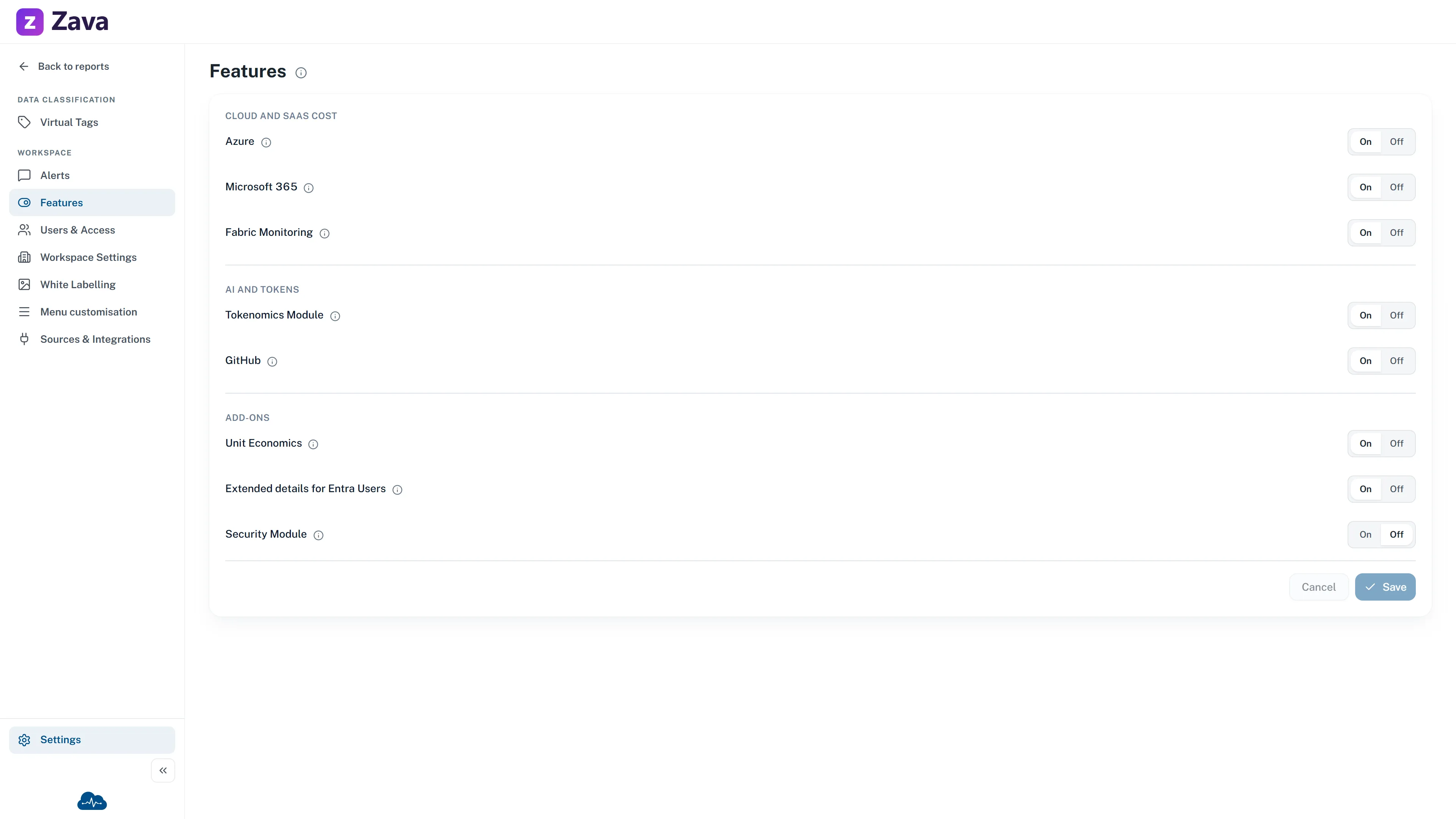
Settings ▸ Workspace Settings ▸ Features.
Turn the modules available in this workspace on or off. Changes apply immediately.
One row per module, each with an On / Off switch and a description. Hover the marker beside a name for what that module actually gives you.
What each one covers
Section titled “What each one covers”| Module | Adds |
|---|---|
| Microsoft 365 | The Microsoft 365 report — tenant usage, licensing and security |
| Tokenomics | The AI spend reports: AI Spend, AI Tool Adoption, spend by business unit, power users, seat utilization and TokenMaxing |
| Unit Economics | Cost expressed as a rate — per customer, per user, per request |
| Fabric Monitoring | The Capacity Metrics tab inside the Fabric report. Not a screen of its own — Chargeback, Capacities and Workspaces stay available either way |
What happens when you switch one off
Section titled “What happens when you switch one off”Immediately, with no reload:
- Its menu rows disappear.
- Anyone with a saved link to one of its screens gets a page saying it’s turned off, with the route to have it re-enabled. They don’t get an error or an empty report.
- Its groups vanish from Sources & Integrations.
Nothing is deleted. Switch it back on and everything returns exactly as it was.
Two behaviours worth expecting
Section titled “Two behaviours worth expecting”Gated menu rows appear a moment after the rest. CloudMonitor won’t show a module until it has positively confirmed your workspace has it. That produces a brief pop-in, which is the honest rendering of “we don’t know yet” — the alternative would be flashing a module at someone who doesn’t have it.
If the setting can’t be read, modules stay hidden. During a rare outage of the settings service, optional modules disappear until it clears. That’s deliberate: “we can’t confirm you have this” must never resolve to “show it anyway”. Nothing is lost, and it heals itself.
If the tab is empty
Section titled “If the tab is empty”No features are configured for this workspace. — the module catalogue hasn’t been set up. Contact support rather than trying to fix it from here.
When a module is switched off
Section titled “When a module is switched off”A switched-off module exists and works; the workspace simply does not have it enabled. An administrator can enable it in Settings ▸ Features. Unit Economics is an ordinary optional module and is switched on for new workspaces by default.