The Cost Allocation report
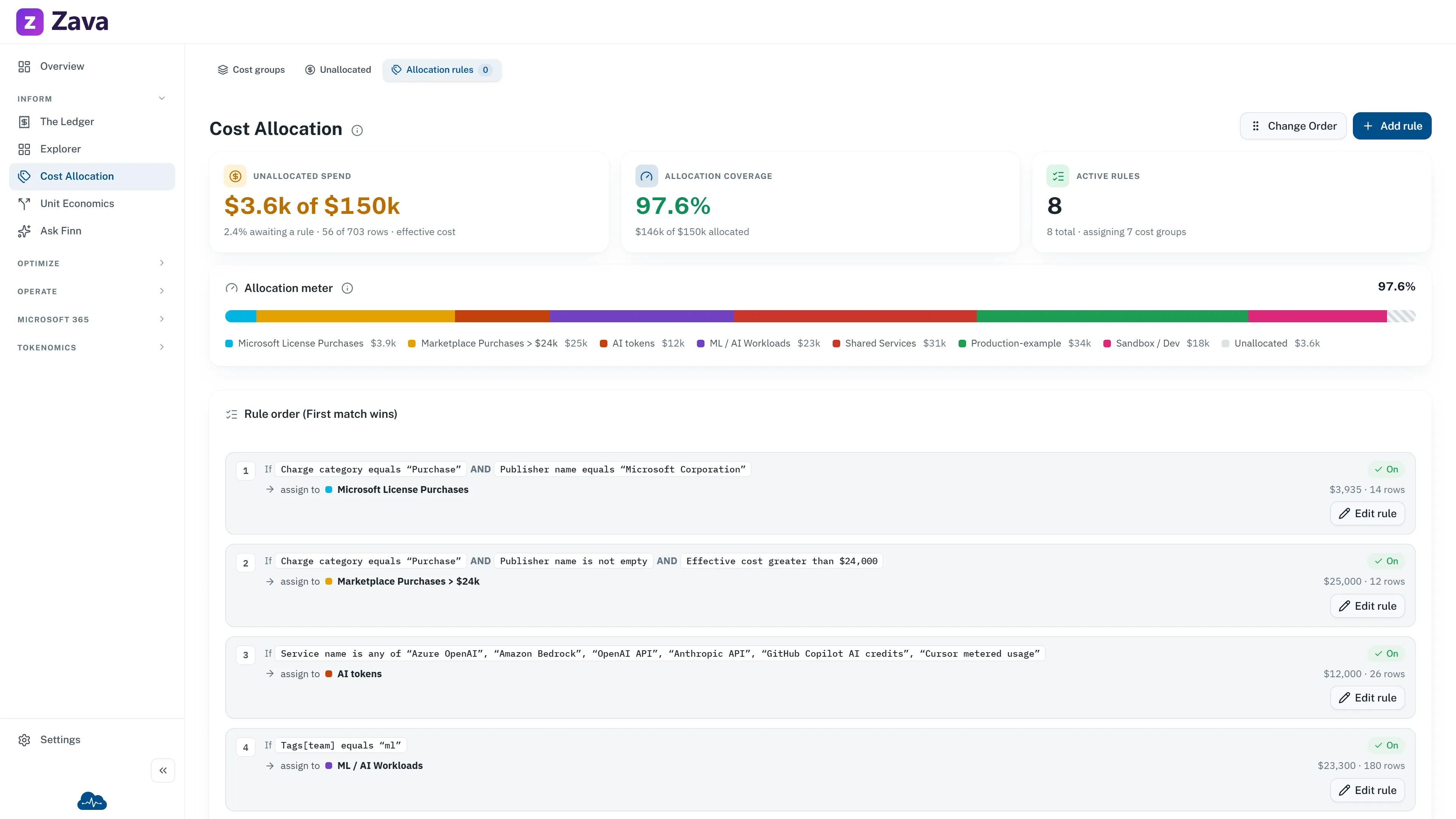
Every charge in your bill is assigned to exactly one cost group. This report shows how that division comes out and which rule made each decision.
It’s the read-only view. The same screen under Settings ▸ Allocation rules is where an admin changes things — see Roles and access.
How allocation actually works
Section titled “How allocation actually works”Rules are evaluated in order, first match wins. The header says so: Rule order (First match wins).
A rule is a condition and a destination: if a charge looks like this, it belongs to that cost group. CloudMonitor walks the list top to bottom and stops at the first rule that matches.
Pinned at the bottom is a catch-all that sends everything unmatched to Unallocated. It can’t be removed, because every charge has to land somewhere — that’s what makes the cost groups sum to your total bill rather than to some fraction of it.
Two consequences worth internalizing:
- Order is meaning. Move a broad rule above a narrow one and the narrow one stops firing. Nothing errors; the numbers just change.
- A charge is never in two groups. This is a division of the bill, not a set of overlapping tags. If you want overlapping views, that’s what virtual tags are for.
Reading a rule
Section titled “Reading a rule”Each rule shows its position, what it matches on, and the group it assigns to. Conditions are built from the fields on a charge — service, subscription, resource name, tag, region, charge type and so on — with operators like equals, contains, starts with or in list.
Some rules route by naming convention instead of a fixed destination: they read a short code embedded in a resource or reservation name and send the charge to whichever group carries that code. One rule then covers a whole naming scheme rather than needing one rule per team.
A rule marked Invalid isn’t applying. Usually its target group was archived or deleted. Its spend falls through to whatever matches next — often the catch-all.
Why the filters are grayed out
Section titled “Why the filters are grayed out”Because this page isn’t a cost read. The provider chip is hidden outright — the allocation plane covers your whole organization across every provider, so narrowing it to one would be meaningless. The others show inert with the reason.
Allocation versus tagging
Section titled “Allocation versus tagging”The distinction that causes the most confusion:
- An allocation rule decides which cost group a charge belongs to. It moves money.
- A virtual tag maps several spellings of one tag onto a single reporting name. It renames, and moves nothing.
You’ll usually want both. Allocation gives you a clean division for budgets and chargeback; virtual tags give you a consistent way to slice across that division.