Budgets & Forecasts
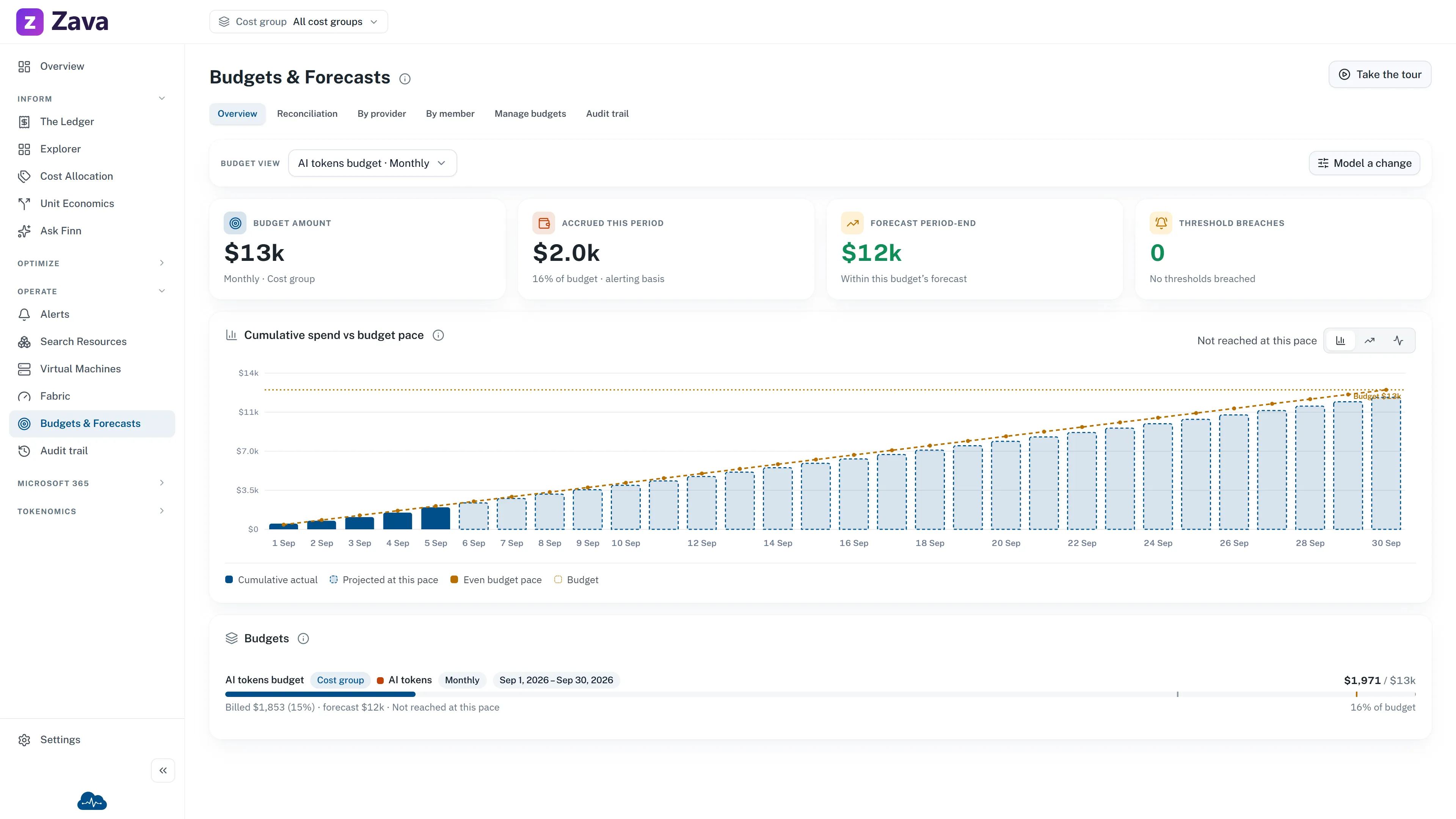
Where every budget stands against what’s actually been spent, with a projection of where the period finishes.
Two ways to look at it
Section titled “Two ways to look at it”Portfolio overview shows every budget side by side.
Or pick one budget for a comparison against its own native period. That distinction matters: a portfolio can mix monthly, quarterly and annual budgets with overlapping scopes, so the figures sit alongside each other and are never summed. Adding an annual budget to a monthly one produces a number that means nothing.
Reading the pacing
Section titled “Reading the pacing”Cumulative spend vs budget pace is the chart to look at. It plots spend so far against the line you’d be on if you spent evenly through the period.
Above the line early in a month is often fine — spend is lumpy. Above the line and diverging is the shape that matters, and it’s visible here well before the total crosses the budget.
Pacing is available for org-wide and cost-group budgets without a vendor set. Narrow a budget to specific providers and the pacing view doesn’t apply.
Accrued and billed
Section titled “Accrued and billed”Budgets track two figures:
- Accrued — usage priced up, near-daily. This is what alerts fire on, because waiting for an invoice to tell you you’re over is waiting too long.
- Billed — invoice-confirmed. This is what you reconcile against.
The Reconciliation tab shows them together. They should converge as a period closes; a persistent gap is worth investigating rather than accepting.
Thresholds
Section titled “Thresholds”Each budget carries its own alert thresholds, of two kinds:
- Actual fires on spend already incurred.
- Forecasted fires on the projected run rate — an early warning that you’re heading over.
A budget can have several, so you can be told at 50%, 80% and 100% rather than only when it’s too late.
Thresholds are configured with the budget under Settings ▸ Budgets. Admins can budget any scope; cost group owners can budget the groups they own. See Roles and access.
”Budgets need currency repair”
Section titled “”Budgets need currency repair””If you see this, one or more budgets are stored in a different currency from your workspace’s reporting currency, and can’t be evaluated.
CloudMonitor never converts currencies. Someone has to open Manage budgets and re-enter each affected amount in the current reporting currency. Until then those budgets aren’t being tracked — which is worth acting on rather than dismissing.
Filters
Section titled “Filters”Only the cost basis applies here, and there’s a good reason.
Each budget already carries its own period, its own scope and its own provider set. Applying the top-bar Period would quietly turn an annual budget into a monthly comparison; applying the cost group filter would double-scope a budget already scoped to a group. So the chips are grayed out with the reason rather than producing plausible nonsense.
Parts that are illustrative
Section titled “Parts that are illustrative”Most of this page is your real data: budgets, thresholds, accrued and billed spend.
Some of the vendor-level breakdown and AI spend per team member is not. Per-person AI spend needs per-seat feeds from the AI providers that aren’t connected yet — you can set the budgets today, and the spend fills in when that ingestion lands.
Each panel says which it is. Check before quoting a per-person figure.