Skip to content
Documents an earlier release of CloudMonitor — the app, screenshots and steps shown here may have changed. See the current FAQ.

Grant CloudMonitor access to Billing data legacy

Allowing CloudMonitor to access and view billing Information requires different steps depending on the type of Billing Account Type you have.

Select your type of Billing Account Type below:

  1. Microsoft Customer Agreement (MCA)
  2. Enterprise Agreement (EA Legacy)

Note: Credit, MOSP and other Account Types other than MCA and EA are not supported by CloudMonitor.

To check your Billing Account Type refer to this article: https://learn.microsoft.com/en-us/azure/cost-management-billing/manage/manage-billing-access#check-the-type-of-your-billing-account
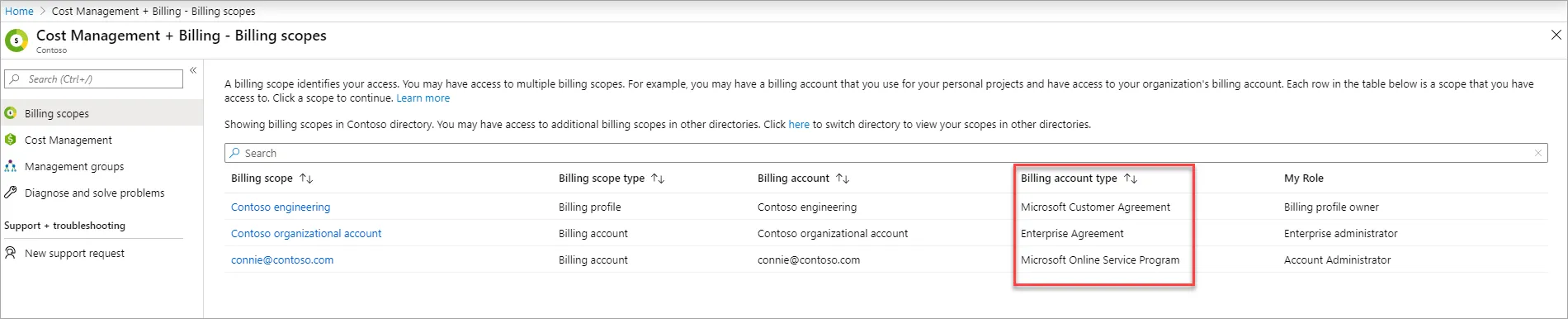
Azure portal Cost Management + Billing page showing where to identify your billing account type

Live chat didn’t load

This browser blocked our chat widget, so the support button can’t open. A privacy shield or content blocker is the usual cause.

  1. Click the Brave Shields icon (the lion) beside the address bar.
  2. Turn Shields off for cloudmonitor.ai.
  3. Reload this page. The chat icon returns bottom right.
  1. Open your content blocker or privacy extension.
  2. Allow cloudmonitor.ai.
  3. Reload this page. The chat icon returns bottom right.

Rather leave the blocker on? Send us a message or search the help desk.